The Hand-Drawn Floral Circle: A Versatile Asset for Practical Workflows
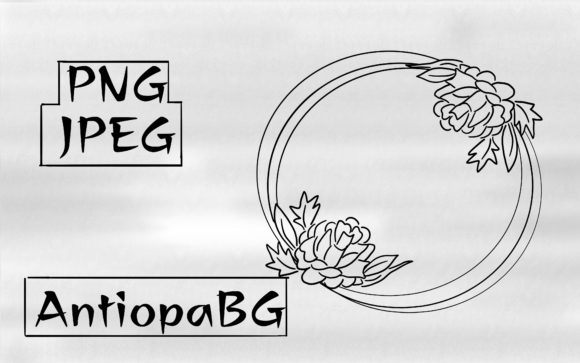
The Floral Circle illustration—a single, meticulously crafted ring of hand-drawn blossoms and foliage—is more than just a pretty graphic. At 4000x4000 pixels with both a transparent PNG and a white-background JPEG, it represents a high-resolution digital asset engineered for integration. For professionals, creators, and business owners, its value lies not in its standalone beauty, but in its capacity to become a functional component within larger systems of planning, execution, and communication.
Defining Its Role in Your Process
A Floral Circle is a pre-made illustrative element designed to be deployed. Its place in your workflow is typically not at the inception of a project, but rather in the implementation phase, where visual branding, content enhancement, or design consistency are required. It fits into the broader process after core concepts are solidified and the need for polished visual support arises. Whether you are finalizing a website layout, producing marketing materials, or creating educational content, this asset serves as a ready-to-use solution that bypasses the time-intensive stage of custom illustration.
Consider your project's lifecycle: research, planning, creation, refinement, distribution. The Floral Circle naturally integrates during the creation and refinement stages. Its presence can standardize the aesthetic across multiple deliverables, acting as a visual anchor. This is particularly useful when managing tight deadlines or coordinating with team members who may not have specialized design skills. The asset’s high resolution and dual file formats (transparent for layered designs, solid background for quick placement) mean it is prepared for a variety of technical environments from the outset.
Integration with Tools and Platforms
The practical utility of the Floral Circle hinges on its compatibility. The PNG file with a transparent background is engineered for seamless use in design software like Adobe Photoshop, Illustrator, Canva, or Affinity Designer. It can be placed over photographs, color blocks, or textured backgrounds without requiring complex clipping paths. The accompanying JPEG provides a straightforward option for platforms where transparency isn't supported or for quick insertions into documents, presentations, or basic website builders.
This interaction with other tools is key. You might import the Floral Circle into a social media template suite, using it as a recurring frame for campaign imagery. In a publishing workflow, it could serve as a decorative element in an ebook layout, applied consistently across chapter headers. For entrepreneurs, it might become part of a branded set of email newsletter headers. The asset’s quality—4000x4000 pixels—ensures it remains crisp whether scaled down for a mobile icon or used at full size for a large print poster, maintaining quality control across mediums.
Optimizing for Specific Use Cases
Understanding your end goal dictates how you prepare and use the Floral Circle. For digital use, the transparent PNG is often the default choice. Before importing, ensure your project’s color palette complements the illustration’s hand-drawn style to maintain visual harmony. For print-based workflows, confirm the JPEG’s white background aligns with your paper stock or that it can be easily isolated if needed.
Here are several workflow examples illustrating its application:
- Content Creation for Bloggers: A blogger establishes a monthly theme. The Floral Circle is used as a featured image base, with text layered over the transparent center. This creates immediate visual consistency across posts, reducing the weekly design effort while strengthening brand recognition.
- Marketing Material Production: A small business owner develops a spring promotion. The Floral Circle is incorporated into the banner of sale pages, the corner of Instagram posts, and the background of a digital flyer. This unified visual element ties disparate marketing channels together efficiently.
- Educational Resource Development: An educator creating online course modules uses the Floral Circle to frame key concepts or section titles within video presentations and PDF handouts. This adds a professional, approachable aesthetic without diverting focus from content creation.
Implementation Tips for Smooth Adoption
To integrate the Floral Circle smoothly into your routine, start with organization. Upon downloading the ZIP file, immediately place the two image files in a dedicated "Brand Assets" or "Visual Elements" folder within your project directory or cloud storage. This simple act of categorization prevents the asset from becoming a lost file and promotes its reuse.
Consider creating a brief style guide note for yourself or your team. Document basic usage: "Floral Circle is used for secondary headers and accent imagery. Preferred file: PNG for digital, JPEG for quick print drafts. Do not distort; scale proportionally." This note ensures consistency in long-term use, especially if the asset is applied across multiple projects or by different collaborators.
For efficiency, leverage software features. In tools like Canva or Photoshop, you can save the Floral Circle as a custom element or within a template. This turns a one-time download into a persistent resource, available in a click for future projects. This approach transforms the asset from a static file into a dynamic part of your toolkit.
Balancing Automation with Creative Touch
A crucial observation when using pre-made assets is to avoid over-reliance. The Floral Circle should enhance your work, not define it entirely. Use it as an accent, a border, a stylistic nod. Its hand-drawn nature lends warmth and organic texture, which can soften overly digital layouts or add a personal touch to corporate communications. However, forcing it into every design can dilute its impact and make your output predictable.
The key is to see it as a high-quality component. Pair it with your custom photography, typography, and color choices. Let it interact with other elements. For instance, the transparent PNG allows you to layer it over a photograph of a product, subtly framing it without obscuring the subject. This interaction between the ready-made asset and your original content produces a unique result that feels both polished and personal.
Factors Affecting Long-Term Utility
The longevity of the Floral Circle in your workflow depends on several factors. Its high resolution guarantees it won't become technically obsolete for current print and digital standards. Its simple, classic floral motif offers broad applicability across seasons and themes, avoiding niche trends that might expire quickly. From a usability standpoint, its intuitive, single-element design means it doesn't require complex tutorials to deploy.
To maximize its long-term value, periodically audit its use. Is it still aligning with your evolving brand identity? Is it being used effectively across projects? A simple review can decide whether it remains a core asset or transitions to a situational one. This kind of quality control ensures your resources, including this illustration, continue to serve your process effectively rather than cluttering it.
Ultimately, the Floral Circle frame succeeds when it moves from a downloaded file to an active, dependable part of your visual language. Its preparation—the dual formats, the resolution—is done for you. Your role is to integrate it with purpose, connecting it to your tools, your projects, and your outcomes. By doing so, you convert a static illustration into a dynamic workflow enhancer, saving time while elevating the consistent quality of your creative and professional output.